My main goal here is to share my knowledge to other video coordinators/coaches/etc and I want to start this thing off with a post about the absolute insanity that I have cooked up.
I want to preface this by in the coming weeks I will be writing a more detailed guide on the items below if it is something of interest to any other Video staff that would like to try out next season.
Maximizing Thunder 25’s RTSP update
Thunder made some massive changes with their stream capture abilities with this last season’s update. Essentially, if you have a video feed that is capable of spitting out an RTSP video feed and it hits the following factors: “720p 59.94 fps with either 15 or 30 GOP”. There were several more minor factors that I found out – but that was it.
With this in mind – any android phone or iPhone with the correct app and settings could now push a stream capable of being captured in Thunder. Enter IP Webcam Pro for Android & IP Camera Pro (IOS & Android)
By the end of the season, I had three different android phones recording practice from the broadcast angle and both ends of the ice with the broadcast angle available immediately and the two end angles shortly after.
By the end of the season with Thunder I was network capturing via the Blackmagic UltraStudio Recorder 3G. I went from carrying around multiple pieces of capture equipment to the tiny UltraStudio controller and a USB-C cable.
Homemade Scorebug
This idea was thanks to Prince George’s Dylan Lukinchuk who came to me early in the season asking if it were possible to get a scorebug or gameclock of some type into the feed. At that time I brushed it off a bit as impossible, but then I got to thinking with the RTSP changes with Thunder and what it opened up I got to working. Thanks to OBS & an RTSPServer plugin.. I found out it was very possible.
The process seems a little hectic but I will write in depth about it later:
- I would have two video feeds: my capture box & an android phone running a RTSP capable video stream. Both recording at 720P/60FPS
- These two feeds I would pull up into the OBS program. Inside OBS you can crop the size (and many more parameters) of either feed. I would crop down the android camera feed so it was just the gameclock. From there I would overlay it into a corner on top of the capture box that my stream was on.
- OBS would be spitting out an RTSP feed that Catapult Thunder would accept.
- The only negative would be the stream would be further behind the actual game if you are watching and marking it live, but that is easily fixable with Thunder’s “Change Offset” option.
Now to put this word salad above into pictures and how over the top I got, this was the first game of the season with my Scorebug setup:
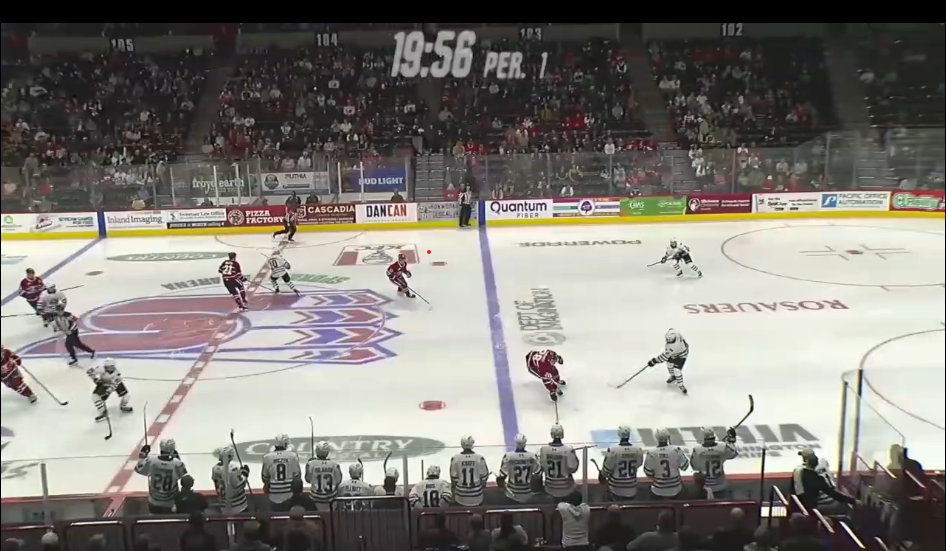
I had a pretty solid base at home, but getting it to look great in other buildings wasn’t the greatest:
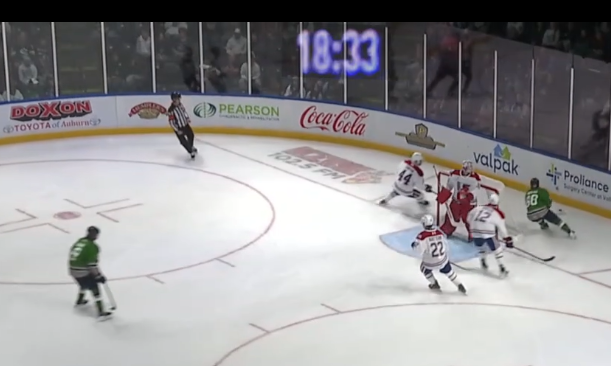
Eventually with some filter work in OBS and reading up on how to make them REALLY work for you, I was able to get excellent quality with transparency of the game clocks in plenty of buildings.
OBS is a very powerful tool that isn’t resource intensive so by the time the playoffs rolled around, this is what the simple score clock had evolved into:
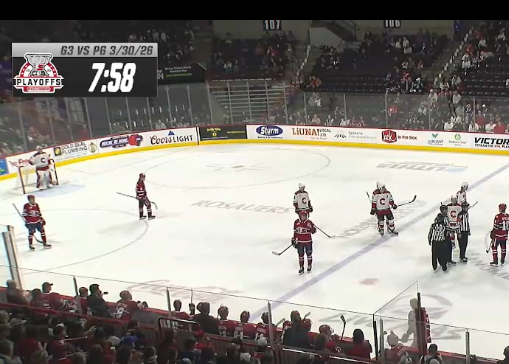
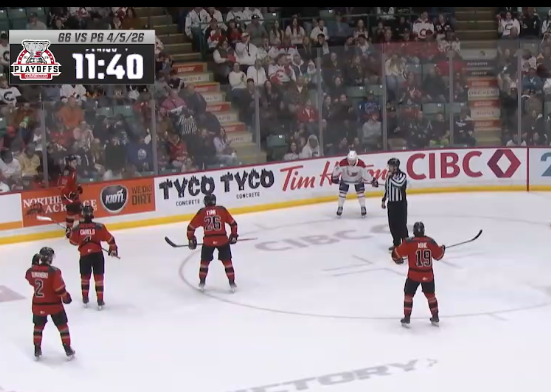
Some scoreboards are hard to crop around but overall, a nice looking scorebug that now can have the date & game updated easily.
Of course, why stop there when you can take it to the next more ridiculous step and put an iso-cam on your equipment guy to sneak into your captures. Obviously… only when the timing is perfect.
I am looking forward to sharing more info about this and other things in the near future. In the mean time – if there are any questions or you want to reach out, click on the “got a question” link above and maybe it is something I can help with.
Thanks for stopping by!
-Bairds